User- Centered Design : Trello
User - Centered Design Approach: Trello

Before buying any product, we always look at its pros and
cons for future use. Sometimes we like a product but are not able to decide
whether it would work for us. Suppose you want to buy a chair that is designed
perfectly but is not able to hold your weight and fails to satisfy you. That
will make you less interested in the product itself. It would have been better
if the makers of that chair had already tested the weight capacity before. Similarly, if you are in the design team and creating a
product for your buyers, in that case, it becomes essential to understand how
people will perceive it. Because without having this understanding, you can
never win a user’s heart. And here comes the User Centered Design (UCD) in
play. Companies primarily practice a user-centered design approach to make more
user-centric products.
In 1993 an Apple employee, known as Donald Norman, was the first person to integrate the phrase 'user experience' into his personally selected job title. He wanted to ensure that systems were designed to meet all aspects of the user’s experience. Since then, many companies have begun adapting their design processes to include the principles of user-centered design (UCD).Ultimately, UCD is a better way for businesses to serve their users by appealing to their needs and desires. The process includes extremely flexible principles that make it easy for any industry to use UCD when developing a killer product.
Let’s take a look at what it is exactly, how the process works, and see a good example of it in action.
What is user- centered design?
User-centered design system is an approach to produce or design the product in a way that fulfills the user’s needs by involving the user in the design process. It is an iterative design process in which designers focus on the users and their needs in each phase of the design process. While designing a new product, it becomes important to understand what you're designing and for whom you are designing. In product designing, your primary focus should not be only on designing for people but to design for the right audience. When a product team develops digital products, it takes into account the user’s requirements, objectives, and feedback. And that is what UCD is, it is all about a tailored experience for users. When we design a new product, it’s always essential to understand who and how people will use it. Without this understanding, there is almost no chance of creating a product people will love.
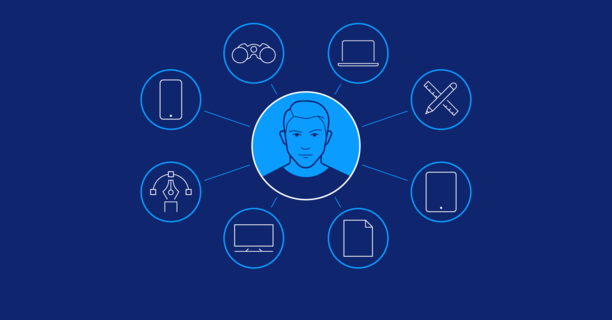
User Centered Design Process
The user-centered design process typically takes four steps:
1. Context analysis
The first step is to analyze the context in which users will use
the product. Who are the future users, and what are their specific applications
for the product? Project teams can find answers by observing and surveying
potential users.
2.
Defining the requirements
The second step is to define the specific requirements for the
new product. This step describes user requirements, taking corporate
requirements into account.
3.
Design
The actual design process doesn’t start until the requirements
have been defined. In the first instance, designers will usually create a
simple prototype, e.g. using paper, followed by digital wireframes, and
finally produce a finished prototype.
4. Evaluation
After a prototype has been produced, the project team asks
potential users for feedback. For digital applications, this is generally done
via extensive user testing and qualitative surveys. Surveys and tests assess
effectiveness (can users achieve what they want?), efficiency (how quickly can
users achieve their objective?) and general satisfaction.
There are many variations of the UCD process. It can be incorporated into waterfall, agile,
and other approaches. Depending on your needs, the user-centered design process
is composed of several methods and tasks. What you are developing, your
requirements, team, timeline, and the environment in which you are developing
will all help determine the tasks you perform and the order in which you
perform them.
Benefits of User-Centered Design
- Customer satisfaction: Close integration of users in the early stages of the development process means that the end product is more likely to meet the customer’s expectations. This boosts revenue and reduces customer service costs.
- Quality: When developers and designers get to know the needs, fears, and requirements of customers, they develop empathy. This results in more ethical and ergonomic products. Aspects that could have been neglected otherwise – like privacy or usability – become important.
- Sustainability: Because the perspective during development is shifted to the needs of potential customers, the resulting products appeal to a broader customer base. In this way, user-centered design also contributes to a company’s sustainability goals.
- Cost efficiency: The costs for alterations remain relatively low, because user feedback is considered right from the start and not only at the end of the product development phase. This enables developers to incorporate user feedback from the get-go.
- Competitive advantage: Since not all companies have made user-centered design their top priority or have had difficulty implementing it, companies that work according to an effective user-centered design process can set themselves apart from the competition.
Trello
UCD answers questions about users and their tasks and goals, then uses the findings to make decisions about development and design.
So let’s consider about Trello as a UCD example.
What is the Trello ?
Trello is a collaborative work management app designed to track team projects, highlight tasks underway, show who they are assigned to, and detail progress towards completion. This tool enables you to organize projects and everything related to them into boards. Trello has a similar appearance to a board with sticky notes and projects and tasks can be organized into columns and moved around easily to indicate workflow, project ownership, and status.
Trello is a web-based, Kanban-style, list-making application and is developed by Trello Enterprise, a subsidiary of Atlassian. Created in 2011 by Fog Creek Software (now Glitch), it was spun out to form the basis of a separate company in New York City in 2014 and sold to Atlassian in January 2017.
Trello's popularity largely comes from its simplicity. While traditional project management tools are designed for professional project managers and use complex techniques like Gantt charts that are not easy to use or understand, Trello emphasizes ease of use which means most people can grasp the basics of Trello in minutes and be successful using it alone or as part of a team within a day.
- The primary reason for designing Trello is overcome the challenge of collaborating and working with team members on projects and tasks.
- Difficult to Collaborate, manage projects, and reach new productivity peaks.
- Unable to empowers our team to manage any type of project, workflow, or task tracking. Add files, checklists, or even automation.
In any industry, collaboration provides many benefits. Teams
can accomplish tasks faster and more efficiently, and collaboration can also
fuel innovation and foster creativity. Collaboration tools, by default, enable
a group of two or more people to collaborate and move towards a common goal or
objective. Although there are plenty of non-technical options, such as post-it
notes, paper, whiteboards and flip charts available.
What steps were followed to identify the solution?
In the first step we identify the problem.
Add Lists and cards to the Trello Board. They are the building blocks of organizing work on a Trello board. Grow from there with task assignments, timelines, productivity metrics, calendars, and more.
What is the solution?
Trello is a collaboration and project management tool that enables teams to move work forward. From meetings and projects to events and goal setting, Trello’s features give any team the ability to set up and customize any workflow.
Trello uses a Kanban framework. It provides capabilities to let
teams manage projects, organize tasks, and build team spirit — all in one
place. The tool is ideal for task management in a to-do list format. It is a
visual tool that organizes, coordinates, and tracks work.
The tool also supports sharing boards and cards across users
or teams. Users can add comments, add members, and attach documents to the
tasks assigned to them. Trello adds greater automation, collaboration, and
administrative control to help teams reach new productivity peaks.
Board
Teams can start up a Trello board in minutes. Users can view
board data from many different angles, so the entire team stays up-to-date in
the way that suits them best. They can choose from the Timeline View for
project planning, Calendar View for time management, and Table View to see
connected work across boards. Board stats are viewable with Trello’s Dashboard.

Lists
A list in Trello is a column that contains cards. How you use and organize lists is entirely up to you and the needs of your project. For example, each list could be a person on the team, and the board tracks everyone's tasks. Or you can organize the list as a workflow, in which each card is moved from one list to another as tasks are processed and completed.
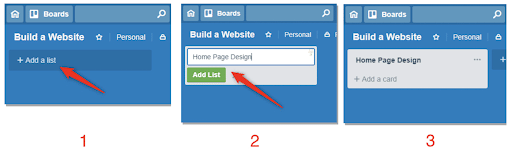
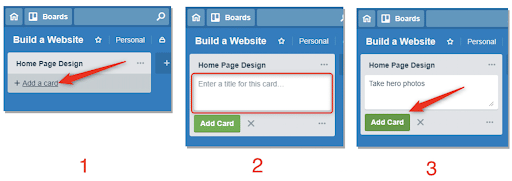
Cards
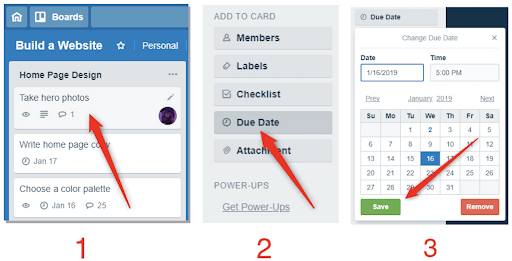
Users can create Trello cards with a click. Trello lets
teams break down bigger card tasks into steps with file attachment previews,
reminders, checklists, and comments with emoji reactions. It empowers teams to
gain an informed perspective by seeing all cards by list and status at the
board level.
No-code automation
Trello comes with a built-in automation feature called
Butler, so teams can focus on work that matters. Butler reduces the number of
tedious tasks on the project board by harnessing the power of automation across
the entire team. This feature uses natural language commands to automate any
task in Trello. Butler automates common actions like moving lists. It also
creates custom buttons, surfaces upcoming deadlines, and schedules teammate
assignments.
Why Trello is good for project management?
It has pivoting power. Using Trello for project management not only gives you a clear view of all relevant tasks, but also the ease and flexibility to rearrange those tasks as your needs and priorities change. If one card isn't ready to move on, no worries. You can still move forward without any hiccups.
Even so, Trello is powerful. Tasks can contain rich information including images and file attachments, plus they can be assigned deadlines and other status tracking data. Tasks can also contain notes, which allow team members to track progress, and specific people can be flagged for action and follow up.
Trello also supports integration with hundreds of third-party apps and services, such as Google Drive, OneDrive, GitHub, Slack, Jira, and many more. It also supports many custom plug-ins designed expressly for Trello , like one that can make a burndown chart based on your Trello board and another that can "snooze" cards until a specified date or time.
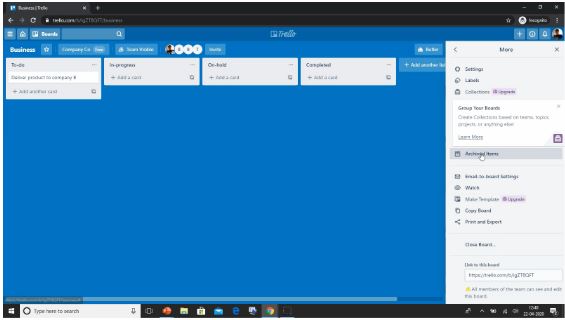
Getting Started With Trello (Demo)
References:
https://en.wikipedia.org/wiki/Trello
https://www.taskade.com/blog/trello-history/
https://www.simplilearn.com/tutorials/project-management-tutorial/what-is-trello#what_is_trello
https://www.o8.agency/blog/user-centered-design-principles-process-examples
https://www.invisionapp.com/inside-design/user-centered-design-definition-examples-and-tips/
Comments
Post a Comment